They will build it themselves.
Ten days of robotics across two weeks, taught the way engineers learn it. They find out how a motor, a gear and a sensor actually work, then they build five machines out of one box of parts and write the code that drives every one of them.
Same arithmetic the students use on day five: gear down for force, gear up for speed, and watch what stalls.
Watch it. Then build it.
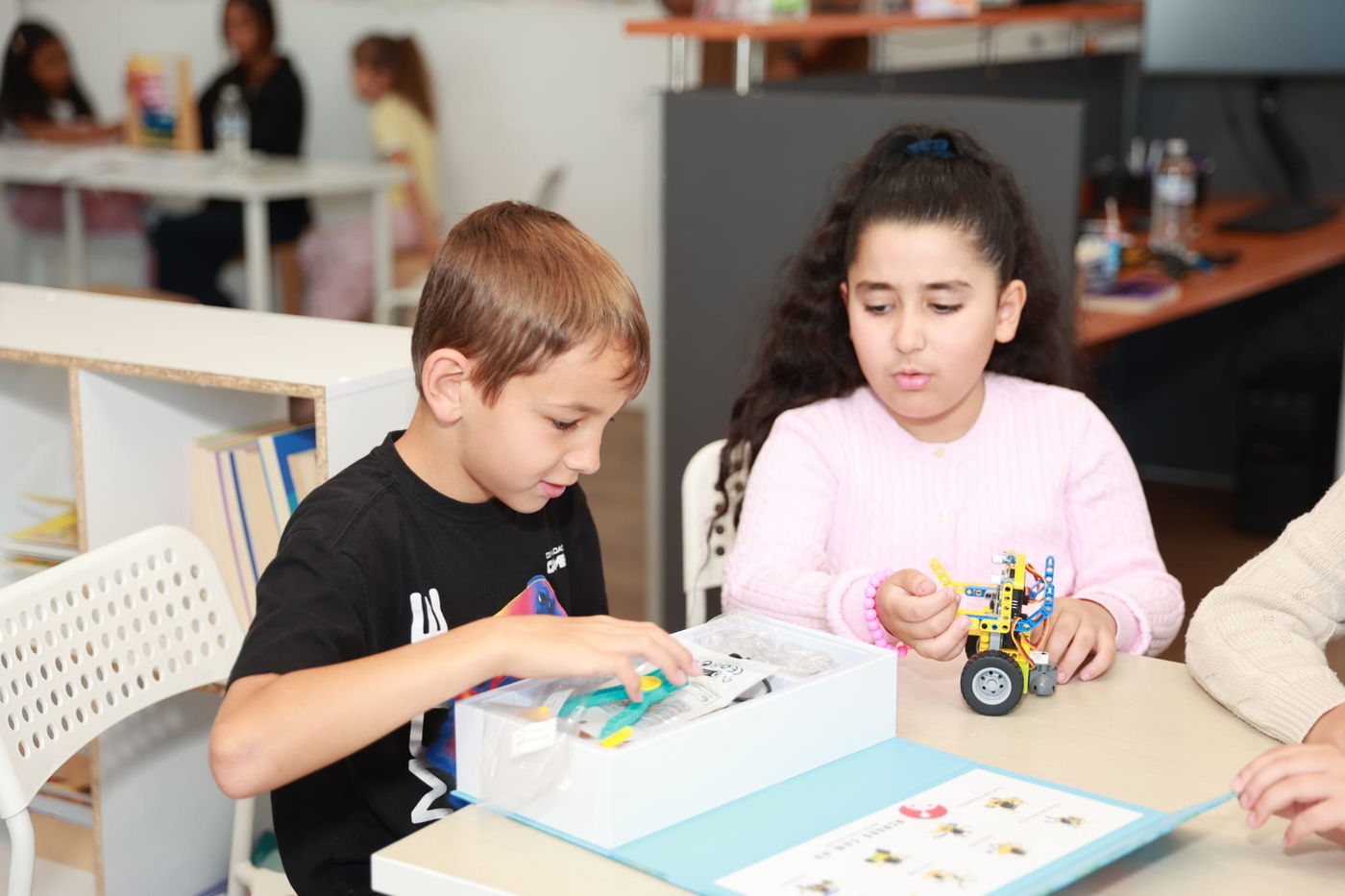
Every step in this course arrives twice. First they watch it done on the real kit, close enough to see which hole the pin goes in, then they do it themselves with the parts on the desk in front of them.
Day six, the build
Two motors pinned into a Technic frame, filmed on the kit they will be holding.
Day six, the code
Writing the program that drives it, block by block, then sending it to the robot.
 Day six, in the centre
Sixty-one short films were made for this course. No stock clips, no animations standing in for the real thing - every one of them is the actual kit, filmed step by step.
The ten days
Five days of groundwork, then five machines. Each day adds one idea and keeps every idea before it. By day nine they are diagnosing a jammed gear train without help.
The Car
Two motors facing opposite ways, five ways to drive it, and lights that show what it is thinking.
What happens in a lesson
The same shape every day, so students always know what is coming. Ninety minutes, and something they built has moved by the end of it.
Gather
Every part checked off against the list before a thing is built. Hunting for a missing beam halfway through is nobody's idea of fun.
Watch
A short film of the next few steps, filmed on the real kit. Hands and parts, not diagrams.
Build
Numbered steps, with the classic mistakes flagged before they happen rather than after.
Code
They write the program themselves in MakeCode and send it to the robot over USB.
Run it
An inspection checklist, then power on. When it misbehaves, the checklist usually says why.
The kit they build with
One box, supplied by Acrobo for every lesson, that comes apart and goes back together ten times in class, and three more at home for families who take a kit home. Most robot kits build one thing and then live in a cupboard. This one gets rebuilt every day into something that behaves differently.
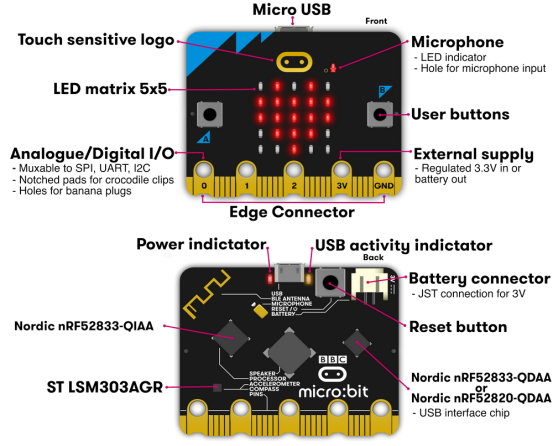
A real computer, palm sized
The BBC micro:bit is used in classrooms worldwide. It has real sensors on board, so from day one your child is reading the actual world rather than typing numbers into a simulation.
- Twenty-five lights they can control one at a time
- A microphone, so a robot can be told what to do by clapping
- A light sensor, a compass and a motion sensor
- Programmed by dragging blocks together, not by typing syntax
- Plugs into any laptop over USB - nothing to install
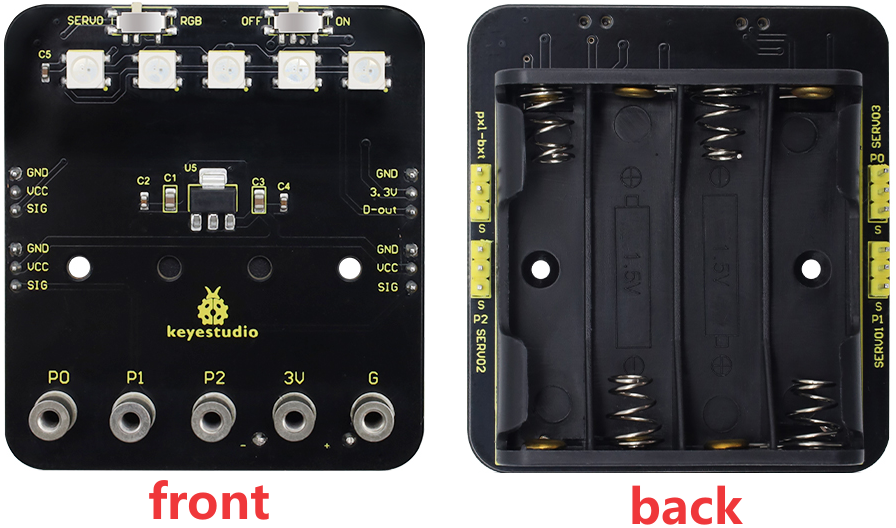
Motors, lights and Technic
The expansion board is where the code stops being abstract. Plug a motor into the wrong header and nothing happens - and working out which header, and why, is half the lesson.
- Continuous-rotation motors, driven by direction and speed
- Five colour lights used to show what the robot is thinking
- Battery power, so the robots run untethered
- LEGO Technic beams, pins, axles and gears
- Every part numbered, so nothing is ever "the grey bit"
You will know how they went
Not a vague "they had fun". Progress here is visible, because a robot either works or it does not.
The foundations check
Before any robot is built, can they wire a motor the right way round, name the parts they are holding, and write a program that runs first time? Their tutor notes what still needs a reminder before the builds start.
Five working machines
Every build finishes with an inspection your child runs themselves - motors square, gears meshing, nothing fouling. Ten days in, they have five robots that ran, and the habit of checking their own work before asking for help.
What is included
Everything they need for the ten days.
- ✓Ten live lessons, ninety minutes each
- ✓A robotics kit for every student, supplied by Acrobo in every lesson
- ✓Sixty-one short films made for this course, not stock clips
- ✓An interactive workbook for every module, which saves their answers
- ✓Ten badges, earned one per module
- ✓Five working robots built in class
Add a place to your cart. Your centre confirms a start date.
Questions parents ask
+Do they need to know how to code already?
No. Day one assumes they have never written a line. MakeCode works by dragging blocks together rather than typing, so spelling and reading level are not the barrier they would be with a text language. By day six they are writing programs on their own.
+Do they need to bring a kit?
No. Acrobo supplies the micro:bit, the expansion board, the motors and all the Technic parts, and they use the same kit every day. All they bring is a laptop.
+Is this just following instructions?
The building steps are guided, because a child who cannot get the robot together never reaches the interesting part. The code is not. Every build introduces a problem the instructions deliberately leave for them - why the car spins instead of driving, why the legs jam, why the wheel stalls.
+What happens when a robot does not work?
That is the most useful moment in the lesson, and it happens to everyone. Almost every failure traces back to something checkable: a motor mounted backwards, a gear out of line, a plug in the wrong pin. Learning to find it is most of what the course is teaching.
+Grades 3 to 6 is a wide range. Will it suit my child?
The reading is pitched at the younger end and the engineering at the older end, so a Grade 3 student is stretched by the ideas rather than by the words. Classes are capped at twelve so the tutor can pitch each build to the child in front of them.
Ask us anything.
Tell us a little about your child and we will come back to you with the next available start date.